

How Do You Make a Stylish Name with a Stylish Name Generator?
A stylish name generator converts the name you type into Unicode characters that imitate fancy fonts, frames them with decorative symbols, and hands the finished version to your clipboard so it can go into any game, profile or chat. No installation is needed, and on our generator the whole job takes a few taps.
The habit is older than most people assume. Symbol nicknames spread from early browser games into Instagram captions, TikTok handles and Facebook profiles, and today nearly every PUBG Mobile squad and Free Fire guild has at least one player whose tag is wrapped in crowns and wings. What changed is the tooling: nobody hunts for symbols one by one anymore.
Here you type your name once, and the page mixes it across 100+ fonts and 350+ decorations, which multiplies a single word into thousands of variations. Every result is real text, so you can copy and paste the fancy name into WhatsApp, Discord or a game rename box exactly as it appears.
The tool is free, needs no login, and runs inside your browser for privacy: the name you type is never sent to a server.
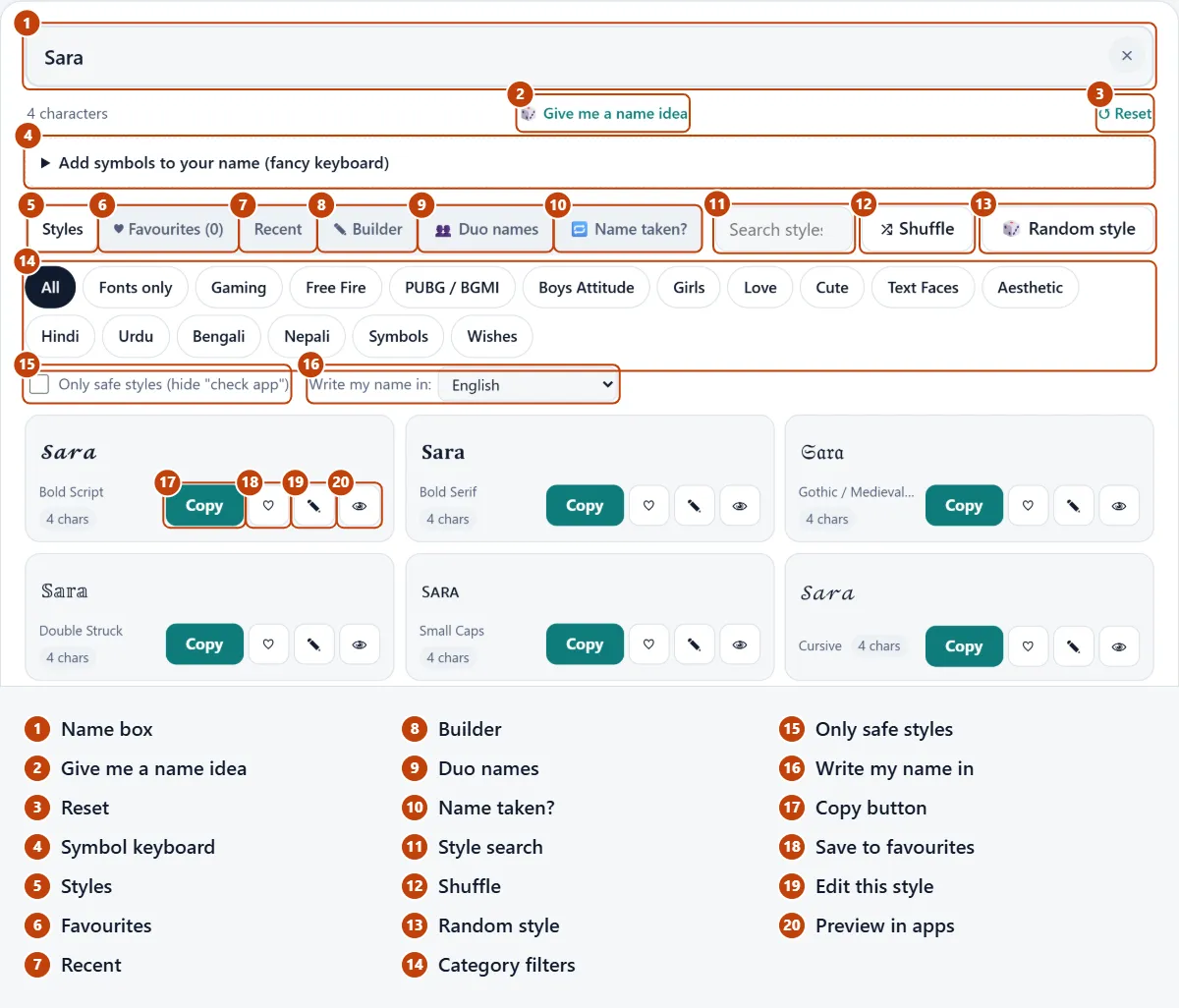
What Actually Makes a Name "Stylish"?
A name becomes stylish when its ordinary letters are replaced by Unicode symbols that copy the shape of other typefaces, so the spelling stays identical while the look changes completely. The capital A alone has dozens of stand-ins, from bold serif and slanted italic forms to flowing cursive, blackletter gothic and circled bubble shapes.
Mathematicians are the unexpected reason this works. Unicode added styled alphabets so equations could be typed as text, and name tools borrowed those blocks for profiles. That is why Old English and Medieval styles exist at all: they are maths letters wearing a costume. Those styled alphabets cover only English letters and numbers, because typesetting formulas was their main purpose.
Because each glyph is a genuine character rather than a picture, a stylish name stays searchable and copyable like any plain text. There is no logo to draw, no image editor to open, no graphic design skill needed and no downloads; how the name looks depends only on font rendering on each phone. Add a frame such as ꧁ ꧂ or 亗, and the result turns into a creative identity instead of a bare label.
How Do I Use a Stylish Name Maker Step by Step?
Using a stylish name maker takes four moves: write your name, narrow the styles, copy one, and check it before you commit.
- Write it once. Enter your name in the box at the top; smart font mapping redraws every style as each letter lands, so there is nothing to submit.
- Narrow the list. Jump to a group such as Gaming, Love or Anime, or look up a style by name, like "gothic" or "crown".
- Copy your pick. Tap Copy on the style you like, and a short "Copied!" note confirms it; the step takes one click and finishes in seconds.
- Check it first. Tap the 👁 eye to see the name in light and dark app themes, and tap the heart icon to keep it.
That last check deserves more attention than it gets. A display name that looks crisp on a dark game screen can turn faint on a white chat background, so test before using it anywhere you paid to rename. Styles tagged check app are the ones most likely to break on unusual devices, and on game pages a fit badge such as ✓ 10/12 tells you at a glance whether the name fits.
Saved picks sit in favourites, which spares you retyping the same word next week, and pasted text keeps its formatting because it is made of plain characters. The share buttons send a friend a link that opens with your name already filled in, which is handy for couples who want combinations that pair well.
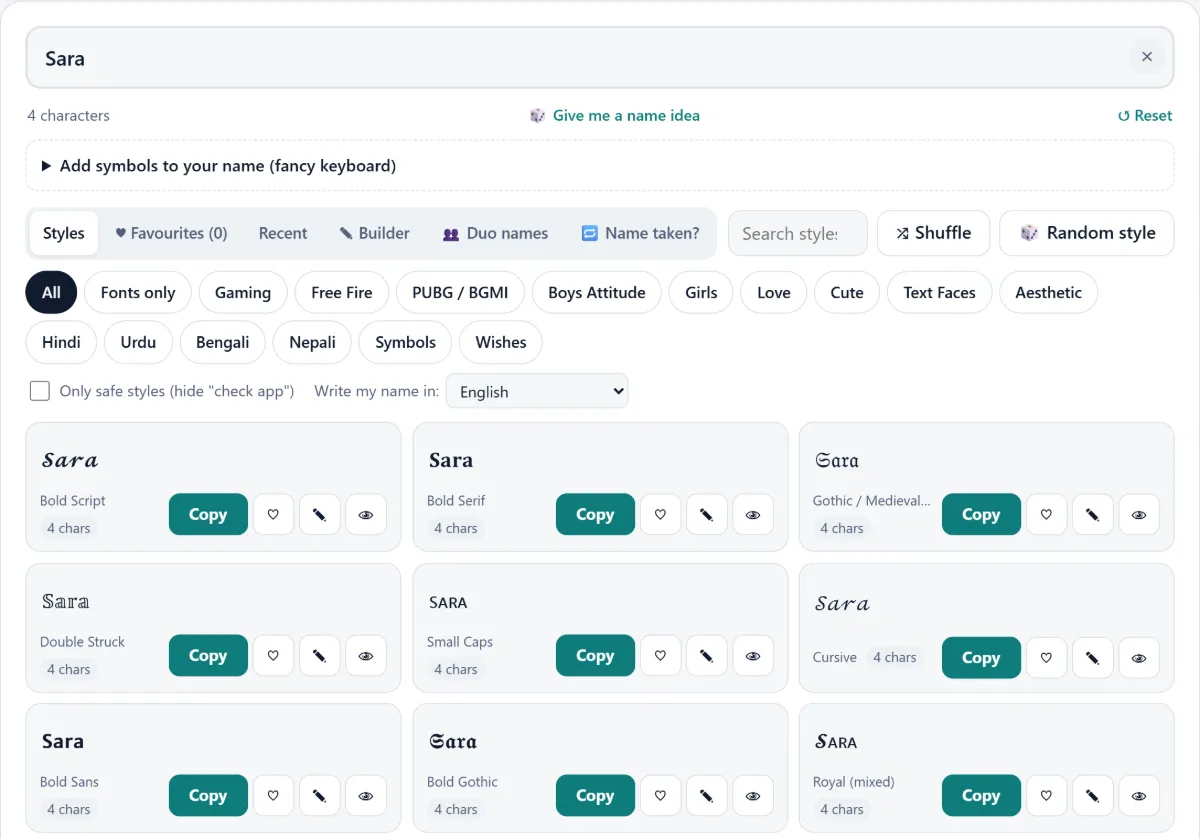
Which Fancy Font Styles Can You Pick From?
Most generators sort their special typography into a handful of families (bold, italic, cursive, gothic, bubble and small letters), and each family carries a different mood, as this quick comparison shows.
| Style family | How "Shadow" looks | Where it fits |
|---|---|---|
| Bold | 𝐒𝐡𝐚𝐝𝐨𝐰 | Gaming tags, announcements |
| Cursive | 𝓢𝓱𝓪𝓭𝓸𝔀 | Elegant profile lines |
| Gothic / Old English | 𝔖𝔥𝔞𝔡𝔬𝔴 | Clan names, dark themes |
| Bubble | Ⓢⓗⓐⓓⓞⓦ | Cute, playful posts |
| Small caps | sʜᴀᴅᴏᴡ | Quiet, minimal handles |
The family is only half the result. Every style is a decorative version built from look-alikes rather than new font files, which is why switching between them is instant. Pairing a style with a mood frame, such as royal crowns or sad teardrops, does more than the letters alone, though none of it can produce colored text; colour comes only from emoji.
Hundreds of styles on one page can bury the good ones, so use the category filters or the search bar before you scroll. If nothing grabs you, Load more keeps the list going and Shuffle deals a fresh mix; searching a mood word such as "crown" tends to beat trying to browse styles by font name. A plain Fancy Text Generator stops at basic font changes, with an Output Length that runs to whole sentences and Ideal Users who mostly restyle captions, while mixing fonts with frames is what turns the regular alphabet into a signature.
Where Can You Paste a Stylish Name?
A stylish name works almost anywhere you can type text, because the characters belong to the same Unicode set that phones and computers already read.
Social apps are the obvious home. Instagram accepts these styles in names and bios, as long as the username stays under 30 characters; TikTok shows them in the display name rather than the @handle; WhatsApp and Discord take them in profile fields and chats. Social media captions benefit too, as long as the decorated part stays short. Unlike a picture, text never has to be resized and re-uploaded for each app.
Games are the second home for gaming handles: Roblox, Minecraft, Fortnite and Valorant players all use decorated tags, though each title runs its own filters; PUBG Mobile, for example, checks names against a 14-character limit. Usernames that log you in usually stay plain, while nicknames shown to others can be fancy; keep the look consistent but match the platform you are on.
Platform makers support these symbols for a practical reason. Facebook and similar sites must handle Urdu, Arabic and hundreds of other scripts, so the operating systems and browsers they run on already carry wide character coverage; that breadth is why both iOS and Android phones show a decorated name. For girls building aesthetic profiles and for gamers alike, the field decides what works, not the font.
How Do Stylish Names Work in PUBG, Free Fire and Other Games?
Stylish names work in PUBG Mobile and Free Fire as long as the decorated name fits each game's length rule and avoids symbols the game rejects.
Free Fire caps names at 12 characters, and some decorative symbols count as two, so a long name plus wings rarely fits. Renaming starts from your profile: tap the pencil icon beside your nickname (older guides call this screen Change Name), then either spend diamonds, with 390 diamonds the figure guides commonly quote, or redeem a Name Change Card from an event. PUBG Mobile is roomier, yet a rename still needs a Rename Card, kept in your Inventory behind the Crate icon, so check character limits before spending anything.
Even a name that fits can surprise you: the game client sometimes strips out rare glyphs, leaving unsupported symbols as gaps, and a name with one rejected glyph is simply called invalid. Each title's terms of service also lets moderators reset offensive or copied tags. A tool that is gaming optimized handles this by flagging risky styles before you copy them.
The look you choose usually signals a role among millions of players. Warrior themes with swords suit aggressive players, attitude tags with skulls suit trash-talkers, and the clean styles favoured by streamers on Twitch and YouTube stay readable on camera overlays. Guilds often agree on a shared symbol like 〆 so the whole roster reads as a team. Players of all kinds, boys and girls alike, also chase a blank name made from invisible characters such as the Hangul Filler (U+3164), a trick some games accept and others block.
Which Name Styles Suit Boys, Girls and Couples?
Boys usually lean toward heavy fonts with sharp frames, girls toward flowing scripts with soft ornaments, and couples toward two names styled the same way, but those are habits, not rules.
A pattern that reads well on small screens is one strong symbol on a single edge rather than both: ⚡Arjun scans faster than ⚡Arjun⚡ in a crowded chat. Gothic and bold remain the go-to for gaming name designs, while softer cursive suits Instagram and Snapchat; avoid overloading a short name, or nobody can pronounce it.
For girls, Handwritten, Heart-Inspired and Elegant Classic looks win followers, and cursive letters with ornamental patterns like ✿ or ❀ look lovely, but cursive glyphs run wider than normal letters, so a long name can be clipped in a bio line. A minimalist small-caps version often survives better on Pinterest, Threads and ShareChat, and it stays legible at thumbnail size.
Couples get the most from one shared font so both names read as a pair, such as 𝓐𝓻𝓪𝓿 ♡ 𝓐𝓷𝓴𝓲𝓽𝓪. Mix and match framing symbols only when both names keep a similar length and a symmetrical layout. Emoji decorations add warmth, Hindi and other regional names can join in through a symbol decorator, and a clear personal tone keeps the name memorable and true to your personal brand. A good stylish name helps you stand out without shouting.
How Do You Choose a Stylish Name That Still Reads Well?
Choose a name style that someone can read aloud after one glance; decoration should frame the letters, not bury them.
A quick self-test works well: if a friend cannot say the name back to you, it carries too many marks. Keep the core letters in the centre and put lightning bolts, hearts or a VIP tag only on the outer edges, so a platform trimming a character still leaves the word intact. Plenty of decorated names on Telegram and gaming forums fail this test by stacking three frames on a four-letter word.
Free Fire names show the trade-off clearly: the Ninja mark (亗Ghost亗) and Tsu tail (Ꮶɪɴɢツ) fit the limit easily, while Warrior wings (꧁༒Raj༒꧂) and an FF tag (ꜰꜰ•Shadow) take more room. Wild Creative Fun fonts leave a lasting impression only when the letters underneath stay clear.
Length matters as much as style. Aim for a name short enough to fit the tightest app you use, then keep that version everywhere; matching looks across apps are what make people recognise you, and the first impression counts most when someone scrolls past an eye-catching tag. Heavy decoration also hurts accessibility, because screen readers can struggle with decorated text and may skip or misread the name entirely.
Why Is Unicode Text Better Than a Name Image?
Unicode text beats a name image because it travels as characters: you can paste it, search it and change it without opening any design tool.
An image of your name has to be cropped and uploaded separately for every app, and it cannot sit inside a username field at all. Real text characters go wherever typing goes, whether that is a game rename box, a WhatsApp status, a post on Twitter or even email signatures, and they arrive without watermarks or compression.
That portability comes from the international standard itself. Unicode is maintained so the same code point means the same character on every system, and newer versions such as Unicode 17.0 keep adding symbols that generators fold into fresh styles. For content creators and influencers juggling five platforms, that consistency of visual presentation saves hours and strengthens their online presence.
The trade-off is control. A hand-drawn wordmark is an artistic rendition you fully own, whereas text depends on the viewer's fonts; on older smartphones a rare glyph may fall back to blank boxes. For most profiles, the convenience still wins.
Which Fancy Fonts Might Not Display Everywhere?
The styles most likely to break are the newest or most obscure ones, such as glitch overlays, Wingdings-style icons, Joiner and Squiggle marks, while common bold, italic, Small Text and double-struck letters display almost everywhere.
The reason is font coverage, not the generator. Every device carries a set of fonts, and when none of them contains a glyph, the phone substitutes empty boxes or question marks; symbol fonts shipped with newer systems close most of those gaps. Stacked combining marks used in glitch text are another weak spot, since some apps collapse them or space them oddly, and symbol support varies even between two apps on the same phone, so Character Support is never identical across devices.
Platform behaviour adds a second layer. Instagram search does not always match a heavily styled name, so people may not find you by typing your real name; keeping the @handle plain and styling only the display field avoids that. Text at least fails gracefully: unlike a picture, it never leaves a broken image link and it loads faster on a weak connection. If a style relies on combining marks, try it in the real app on two devices before you trust it.
Is It Safe to Use a Stylish Name Generator?
Yes, a stylish name generator is safe, because it only produces text characters; nothing is installed and no file runs on your phone.
On this site the conversion happens in your browser, so the name you type never travels to a remote machine. Your Recent list, Recently Generated Fonts and saved styles live on your own device, and clearing your browser history wipes them. There is no sign-up, no subscription and no premium plans, which means no email address or password to leak.
The characters themselves are harmless. They are the same symbols the Unicode standard defines for maths, languages and emoji, and they behave like any typed letter. The only practical downside is display: legacy applications and very old handsets may not draw every glyph.
One caution matters more than any privacy promise: be wary of name apps that ask for contacts or account access. A text tool needs none of that, and anything that does is collecting more than a name in the digital world.
Is a Stylish Name Generator Different from a Fancy Text Generator?
Yes, a stylish name generator builds complete names with frames, symbols and length checks, while a fancy text generator mainly swaps letters into other fonts.
| Feature | Stylish name generator | Fancy text generator |
|---|---|---|
| Output | Decorated names with borders and emoji | Restyled letters only |
| Symbol frames | Built in (꧁ ꧂, 亗, ★彡) | Rare or none |
| Game fit | Length checks for titles like BGMI and Mobile Legends | No game awareness |
| Style range | Fonts × decorations (100+ fonts × 350+ decorations here) | Fonts alone, e.g. Mono Space, tiny text, Boxed |
| Best use | Profiles and gamer tags | Long sentences and captions |
The gap is narrowing. Some font sites now advertise 700+ font styles across 35 categories and others a tighter 100 font styles, yet a long font list still leaves the framing, and the profile name length check, to you. If your goal is a Call of Duty Mobile gamertag or a Clash of Clans display, a name tool saves steps and adds flexibility; for restyling a whole paragraph, a font changer is the better fit.
What Features Should a Good Stylish Name Maker Have?
A good stylish name maker should combine live results, a way to build your own style, a length check for games, and a safe place to keep favourites; anything less sends you hopping between tabs.
Speed comes first. Results should update in real time inside the input box, with no button to press, plus a Random button or clear (×) button for when you want a surprise or a clean slate. A category circle that auto-scrolls to a font group beats scrolling past hundreds of rows, and unlimited generations mean you never hit a wall.
Control comes second. Our tool lets you pick a frame for each side and a font in the middle, and its symbol tray adds crowns or Japanese marks in one tap. A dedicated page for empty names covers games that accept a blank tag.
Safety comes third. A preview of the name on both backgrounds, a copy button that flashes Copied to clipboard, "check app" labels for older phones, an "Only show names that fit Free Fire" filter, and a fit check that warns when a clan tag pushes you past a game limit together stop costly mistakes. No data leaves your browser, so you can paste anywhere with confidence.
Find the right tool for your app
Each app has its own rules, so we made a page for each one:
- Games: Free Fire stylish names, PUBG & BGMI names, gaming names for Roblox, COD and more, and invisible names.
- Social: Instagram name & bio fonts, TikTok, WhatsApp, Facebook and Discord.
- Name ideas: boys, girls, love & couple names, and the nickname generator if you don't have a name yet.
- Text tools: fancy font changer for full sentences, symbols to copy, stylish wishes and the Urdu & Hindi name decorator.
Frequently Asked Questions
Is the stylish name generator free?
Yes, the stylish name generator is completely free, including the builder, the symbol picker and the character counter. You can choose a left decoration, a font and a right decoration with no registration, no social media connection and no personal information requested. The emotions option, which adds text faces to plain messages, is included too. There are no paid tiers hidden behind certain styles, so a casual player and a daily creator get exactly the same tool, and you can make as many names as you like. If a name site ever asks for card details before showing results, treat that as a warning sign rather than a perk.
How do I change my game name to a stylish name?
You change a PUBG Mobile name by creating the style here, copying it, and applying it with a Rename Card from your Inventory; in Free Fire you use the pencil icon on your profile instead.
- Create and copy a short style on this page.
- Open PUBG Mobile, go to Inventory and tap the Crate icon.
- Select the Rename Card and tap Use.
- Paste the stylish name and confirm.
Each change uses one card, so your new IGN deserves a second look before you tap. Teammates and leaderboards show it right away, which is the whole point. If the game rejects a symbol, swap that one glyph rather than the whole style.
How many characters can a Free Fire name have?
A Free Fire name can hold 12 characters, and decorative symbols count toward that limit, with some symbols counting as two. That is tight: the battle royale scoreboards and the lobby list leave little room, so a frame like ꧁ ꧂ already uses two slots. A 4–6 letter name such as "Ali" or "Zoya" leaves space for one symbol on each side, while the general advice of 8-15 characters for other apps simply will not fit here. Every name change costs diamonds, so count first and keep your guild name just as compact.
How do I fix a name that shows as boxes or question marks?
Fix a name that shows as boxes or question marks, or that the game calls invalid, by picking a style without the "check app" tag, or by installing your phone's system software updates, which usually add missing glyphs. The problem means the device lacks a font for those rare characters; the name itself is not broken. Outdated browsers cause the same issue on computers, and WhatsApp Web can draw a character differently from the mobile app. Paste the name into a notes app first and view it on the phone your friends use most. If it still fails, choose a simpler style.
Can I make a stylish name in Urdu or Hindi?
Yes, but only through symbols: fancy fonts exist for English letters and numbers, so Urdu, Hindi and Arabic names are decorated rather than restyled. Wrap the name in frames such as ꧁ ꧂, stars or flowers, and the original script stays intact and readable. Our Urdu & Hindi page does this in one step, and the result works in any multilingual profile. Many Pakistani and Indian players pair a Latin-styled gaming tag with an Urdu bio, which keeps both audiences happy. The decoration carries the style; the script carries the meaning.
How do I create a blank or invisible name?
Create a blank name by pasting an invisible character, such as the Hangul Filler (U+3164) or the braille blank ⠀, into the name field instead of letters. Some games accept it as a mystery in-game nickname, while others reject empty input or trim it away, so test it before paying for a rename. A blank tag is not a security risk, but moderators in titles popular with kids and teenagers sometimes reset such names because they hide who is talking. Adults in ranked play tend to use them for a bit of mystery. Our invisible name page lists characters that games currently accept.
Can I save my favourite stylish names?
Yes, tap the heart on any style and it moves into your favourites, so you can reuse it later without retyping. Favourites and Recent styles are stored in your browser data on your own device, which gives peace of mind because nothing is uploaded and there are no permissions to grant. Saved names stay editable: paste one back into the box to tweak a symbol, or Export the list before switching phones. Couples often save a matching pair for anniversaries, and the whole feature comes at zero cost with no hidden charges. One session is enough to build a set for every app.